
This hands-on tutorial guides you through the following steps to create an energy-efficient, wireless sensor system with on-device machine learning and seamless data transfer.
- Implement Edge Impulse Machine Learning on a solar-powered Arduino Nicla Voice module to detect and classify sounds.
- Transmit data (the sound detected and voltage level) of the Nicla to an Arduino Portenta H7 using Bluetooth Low Energy (BLE)
- Respond to the received data and transmit data to The Things Network, bridging an edge AI application with a cloud-based IoT network
- Characterize power consumption with Qoitech Otii Ace Pro
- Deploy the system, utilizing solar power for the Nicla and a USB connection for the Portenta H7
Overview of Main Components
The Arduino Nicla Voice
The Arduino Nicla Voice is a compact development board designed for low-power wakeword/keyword spotting and sound classification. It features a built-in microphone, a Neural Decision Processor™ from Syntiant (NDP120), and Bluetooth® Low Energy connectivity. Incorporating efficient power management features for minimal energy consumption allows one to quickly deploy a low-power AI and machine learning application powered by solar. With the Nicla Voice board, you can easily create and train a machine learning model in Edge Impulse, download and flash the generated firmware, write Arduino code to establish a Bluetooth Low Energy (BLE) connection between the Nicla and a Portenta or MKR board, then send the data to The Things Network.
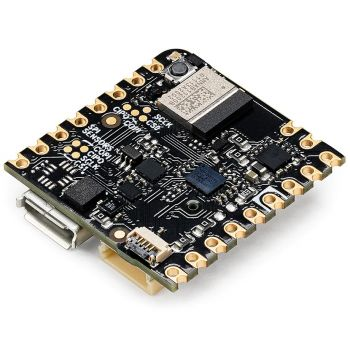
Nicla boards are designed to work as an autonomous, battery-operated system.
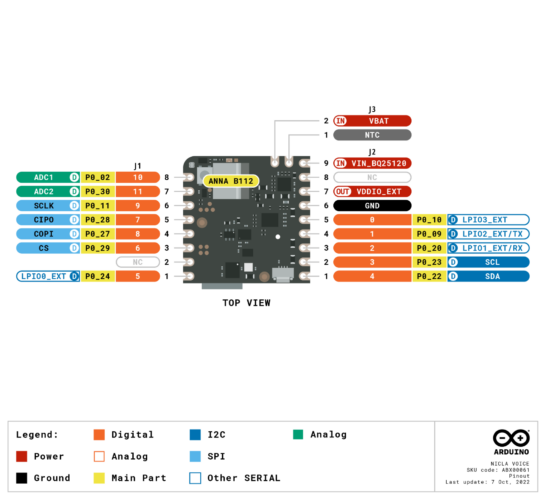
Nicla Voice Pinouts
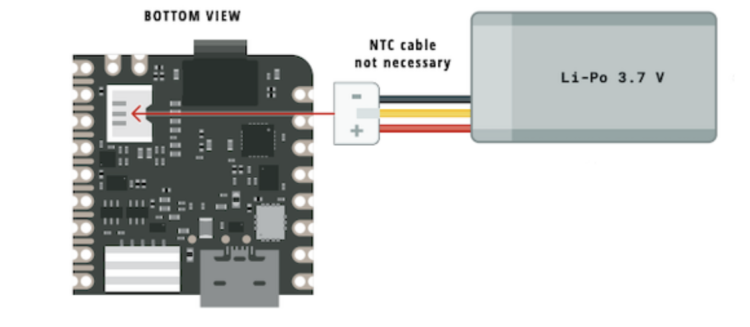
Nicla Battery polarity
The Portenta H7
The Portenta H7 is ideal for advanced IoT and edge computing projects. In this project, the Portenta H7 will act as an intermediary in an audio classification system, receiving data from a Nicla Voice board. The Nicla Voice communicates with the Portenta H7 via Bluetooth® Low Energy, transmitting the classification results. The Portenta H7’s role is to process and forward the data to The Things Network. This setup showcases the Portenta H7’s capability to bridge edge AI applications with cloud-based IoT networks.
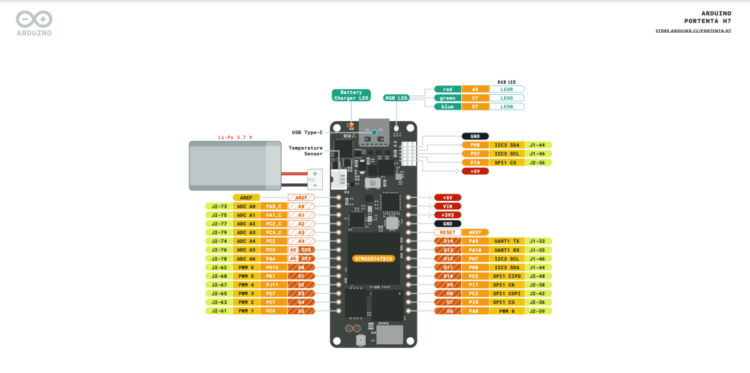
Portenta H7 pinouts
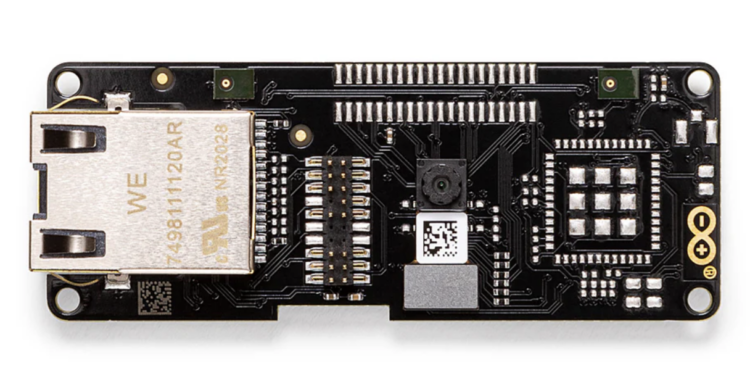
The Vision Shield -LoRa
Alone, the Portenta H7 cannot communicate with The Things Network. That’s where the Arduino Portenta Vision Shield – LoRa comes in. The shield provides long-range LoRa wireless connectivity, enabling the Portenta H7 to send data connected from sensors or peripherals like the Nicla Voice and transmit the data over LoRaWAN.
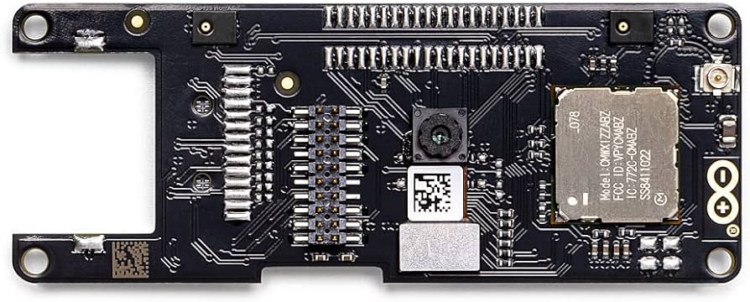
The Portenta Vision Shield -LoRa
Tutorial Parts
Hardware
- Portenta h7
- Nicla Voice
- Dipole Pentaband Waterproof Antenna
- Portenta Vision Shield – LoRa
- USB C Adapter Charger Charging Cable
- CONN RCPT HSG 3POS 1.20MM- ACHR-03V-S
- JUMPER SACH-003G-P0.2 X2 8- ASACHSACH28W203
- Adafruit Universal USB / DC / Solar Lithium Ion/Polymer charger – bq24074
- Lithium Ion Capacitor Solar Charger
- MT3608
- Panel
Software
An Introduction to BLE
Bluetooth is a short-range wireless technology that operates in the unlicensed 2.4 GHz ISM (ISM refers to radio frequency bands originally reserved for industrial, scientific, and medical purposes) to transmit data and build personal area networks (PANs). While the Bluetooth Specification has been around since the 90s, the Bluetooth® Low Energy protocol was introduced in 2012 to provide wireless connection to IoT devices. It operates with ultra-low power and was designed for short-range applications. Where Bluetooth Classic runs continually, data communication with an LE radio happens in short bursts that don’t need to be very frequent. A typical LE use case would include:
- Periodically turning on the radio
- Transferring or receiving a few bytes or kilobytes of data
- Turning off
- Returning to sleep
To transfer data from a BLE device to the Internet or The Things Network, another BLE device with WiFi or LoRa connectivity must receive it and then relay it.
In a Bluetooth® LE connection, you will have a central device or server and a peripheral device or client. The central device is typically more capable with features like a higher CPU power, more memory, or a larger battery, while the peripheral device is generally resource-constrained, at least when compared to a central device. Peripheral devices advertise their presence and data to make themselves discoverable by other devices, particularly central devices. During advertising mode, the peripheral device periodically broadcasts advertising packets. These packets contain information about the peripheral’s identity, services, and characteristics.
In advertising mode, the peripheral device is not actively connected to any central device. It remains in a low-power state while broadcasting advertising packets and “waiting” for a central device to establish a connection.
Central devices initiate connections to peripheral devices by scanning for those that are advertising or broadcasting information about themselves. When the central device picks up the advertising information from the peripheral device, an attempt to connect to the peripheral device is made. Once a connection is established, devices can exchange data bi-directionally. This information exchange is made using, what is known as, services.
Services and characteristics are the fundamental concepts that organize and describe the data exchanged between devices. To distinguish services and characteristics, Bluetooth® LE relies on a unique identifier called a UUID (Unique Universal Identifier). The UUID is a 128-bit value that serves as a universally unique name for a service or characteristic. It acts like a label or identifier that the central device uses to identify and communicate with specific services and characteristics.
There are various predefined services and characteristics used in common applications. These standardized profiles simplify the development process, making creating Bluetooth® LE-based projects and applications easier.
In this tutorial, you can see in the Arduino IDE Serial Monitor the central device picking up the peripheral device:
MAC address of the discovered BLE device=c1:06:dd:ad:e2:79
Local Name= Nicla Siren Detector
Service=1802
“1802” is a standard 16-bit service UUID signifying the predefined “Immediate Alert service.”
After the central device connects to the 1802 service, it will attempt to subscribe to a characteristic. In this tutorial, the characteristic we’re using is “2A06”, a standard 16-bit characteristic UUID signifying “Alert Level.”
There are three ways data can be exchanged between two connected devices: reading, writing, or notifying. Reading occurs when a peripheral device asks the central device for specific information. Writing occurs when a peripheral device writes specific information in the central device. Notifying occurs when a central device offers information to the peripheral device using a notification. Think of a smartwatch notifying a smartphone that its battery is low.
In this application, the Nicla Voice will be positioned outdoors, while the Portenta H7 will be indoors. This configuration will work because BLE operates on the 2.4 GHz frequency band, which can generally pass through glass with minimal interference. It is important to note that signal strength and quality may be affected. Higher-powered devices will have greater signal strength.
Below is a list of all supported Bluetooth® Arduino products:
| MKR Family | UNO Family | Nano Family | Portenta Family | Nicla Family | PRO family | Mega/Due family |
| MKR WiFi 1010 | UNO R4 WiFi | Nano 33 BLE | Portenta H7 | Nicla Voice | Opta WiFi | GIGA R1 WiFi |
| Nano 33 BLE Sense | Portenta H7 Lite Connected | Nicla Vision | Arduino Edge Control | |||
| Nano 33 BLE Sense Rev2 | Portenta Machine Control | Nicla Sense ME | ||||
| Nano 33 IoT | Portenta X8 | |||||
| Nano ESP32 | Portenta C33 | |||||
| Nano RP2040 Connect |
Project overview
-
-
-
- The Portenta H7 acts as the central device
- The Nicla Voice acts as a peripheral device
- The information to share between the boards comes from the Edge Impulse model
- We name our service alertService and its characteristic alertLevel:
[code lang=”arduino”]
// Alert Service
BLEService alertService("1802"); // Immediate alert
// BLE Alert Characteristic
BLEUnsignedCharCharacteristic alertLevel("2A06", BLERead | BLENotify); [/code] - The central device will connect to The Things Network then scan for peripherals.
- Once the central device connects to the specified peripheral device (c1:06:dd:ad:e2:79), the central device will look for the service called alertService (1802).
- The peripheral device, running the Edge Impulse model generates live inferences, and writes the alertLevel value (0 or 1) to indicate whether or not a siren was detected.
When the central device reads the alertLevel corresponding to a siren it will attempt to send data to the The Things Network. If not enough time has occurred between transmissions, the central device will wait until the message is sent successfully before resending data.
Implementing the Edge Impulse model
The first step in this project is to create the ML model.
The basic steps to follow are:
- Collect
- Design
- Test
- Deploy
- Login or create an Edge Impulse account.
- Create a new project by clicking on the Create new project button:
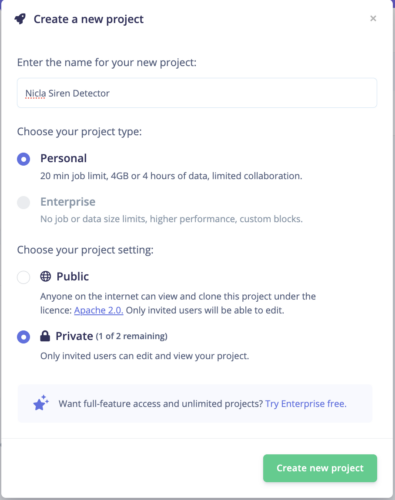
- Name your project and click on the button:
- Click on Add Existing Data:
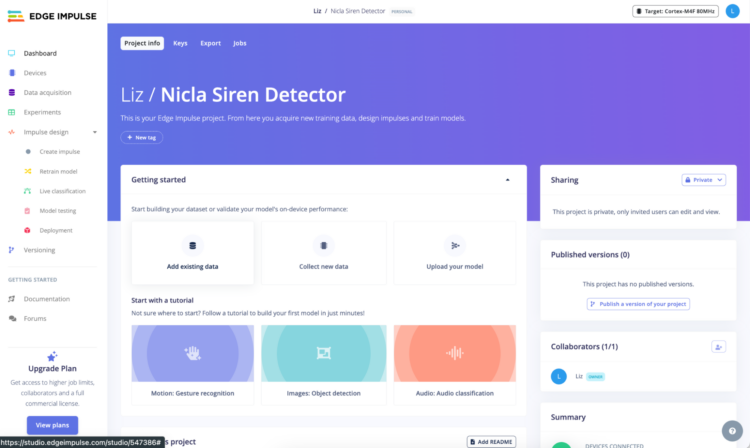
- You can collect sensor, audio, or image data:
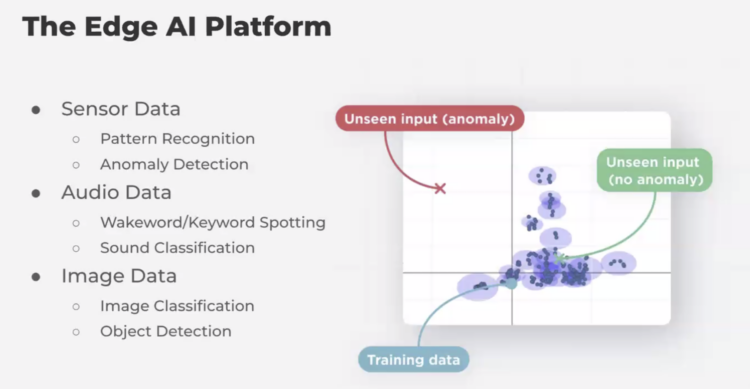
In this case we will use sound files: sirens, background, and traffic noise (non-siren sounds) sound files. You can find the collections at kaggle. - Click on Upload data:
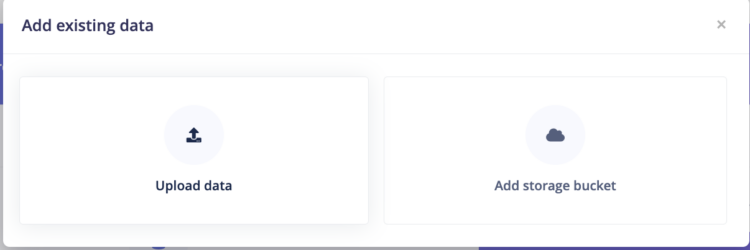
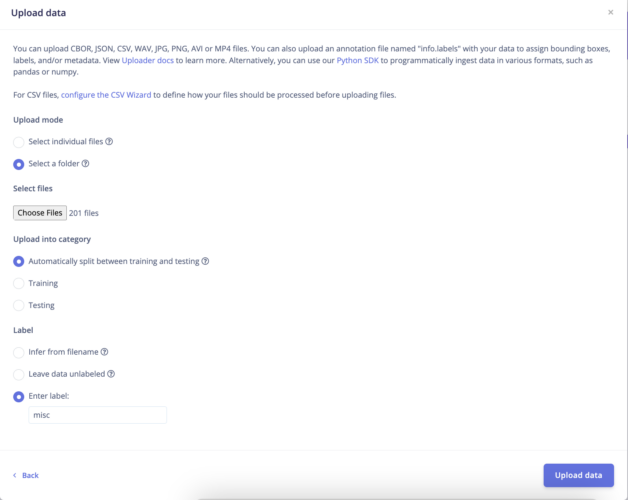
- Select your folder and create a label, then upload:
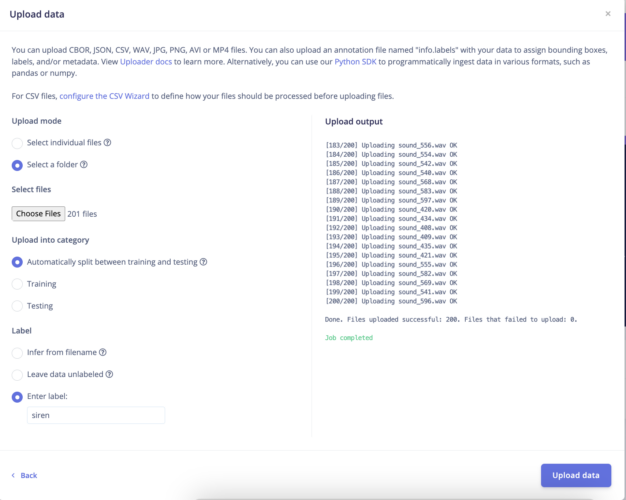
- Upload your other folders and add your labels:
- Add some background sound files by clicking on Connect a device:
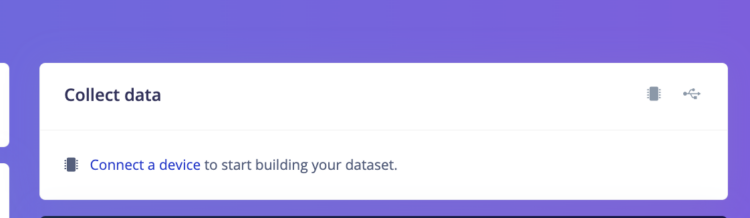
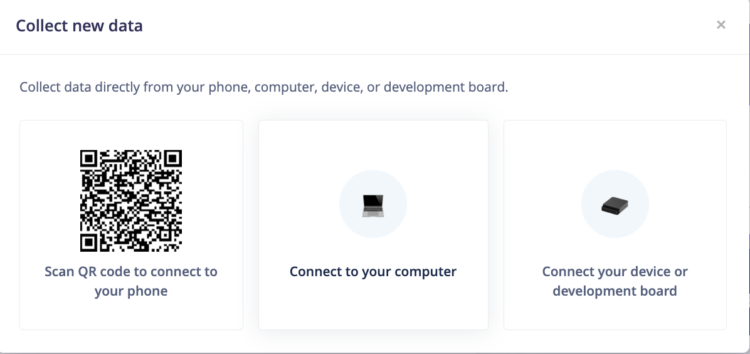
- Then select Connect to your computer:
Record a few minutes of background noise (not sirens)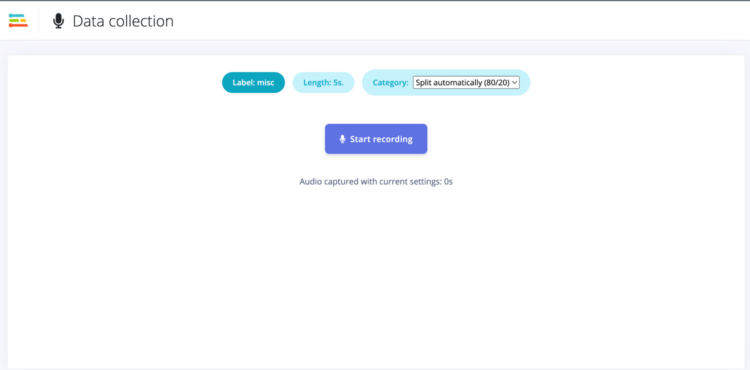
- Select Create Impulse from the left side menu:
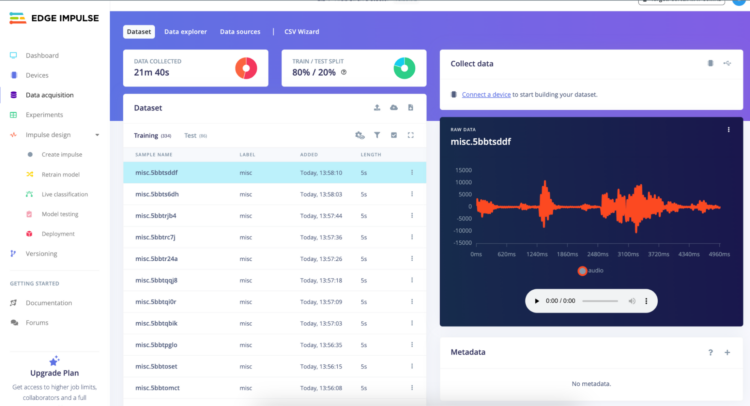
- Configure your target:
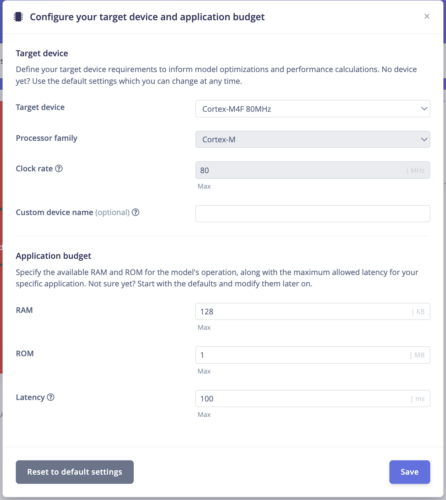
- Change the frequency to 16000 Then click on Add a processing block:
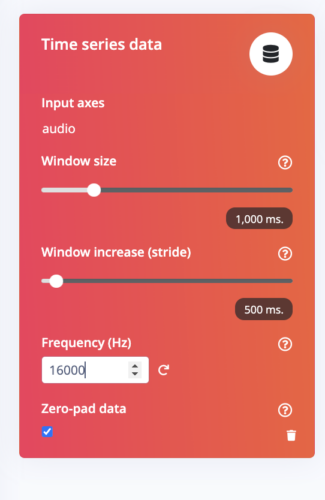
- Select Audio (Syntiant) and then Add a learning block:
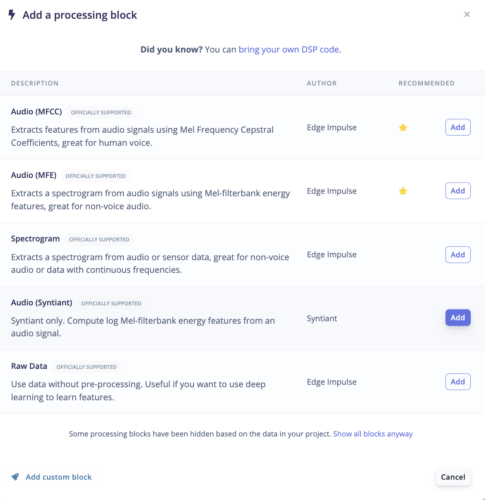
- Select Classification:
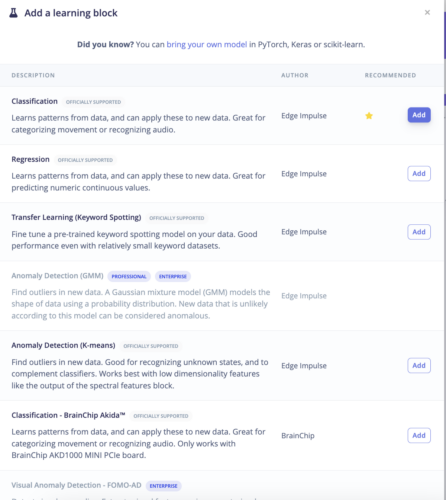
- Save Impulse:
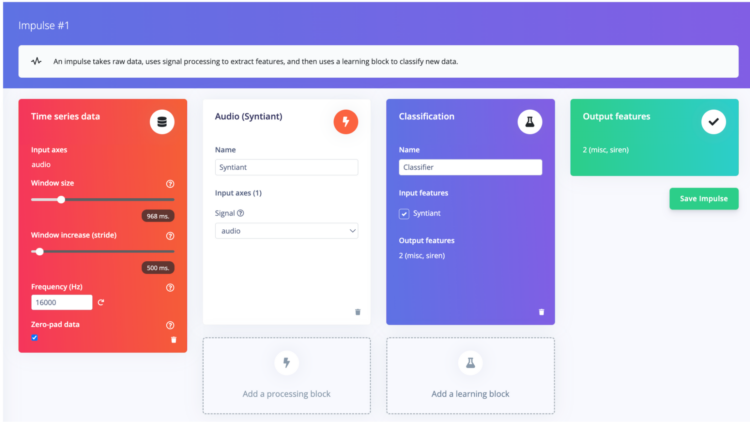
- Click on Syntiant in the left side menu:
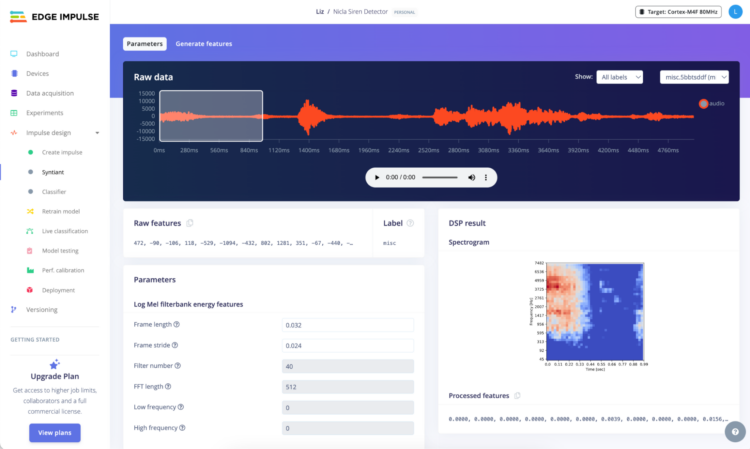
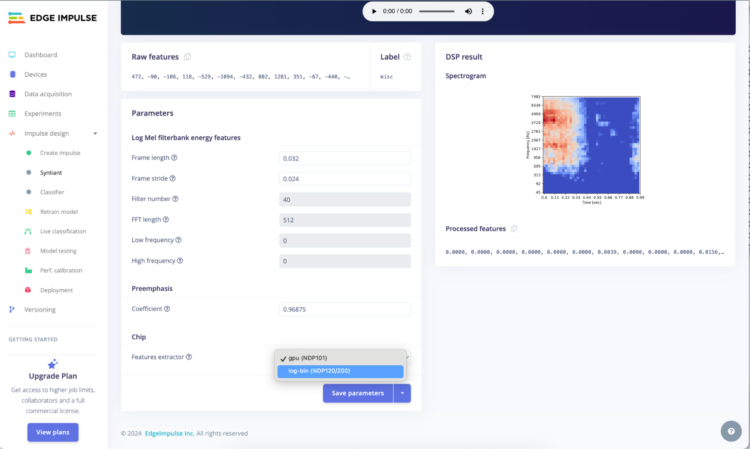
- Change Features extractor to log-bin(NDP120/200):
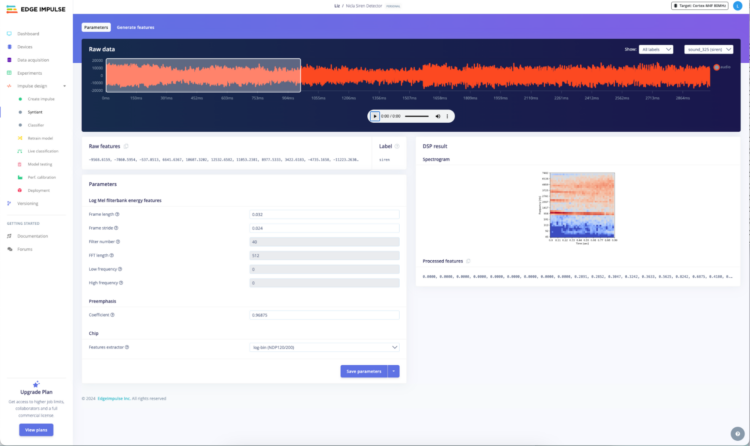
- Select a siren file and click on Save parameters:
- Click on Generate features. This step will take a while:
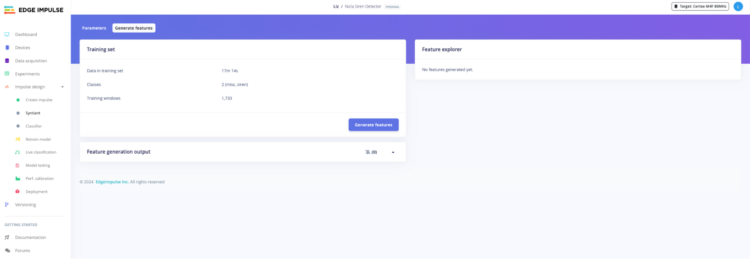
- When the step completes, select Classifier in the left side menu:
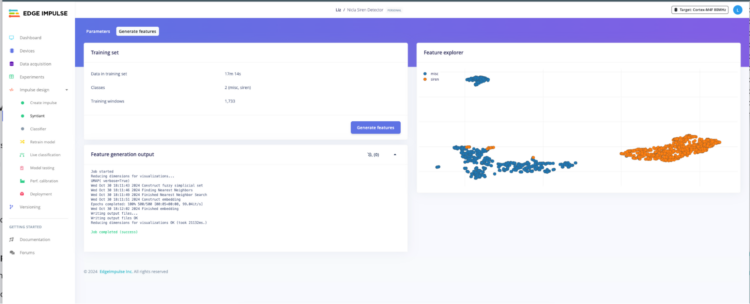
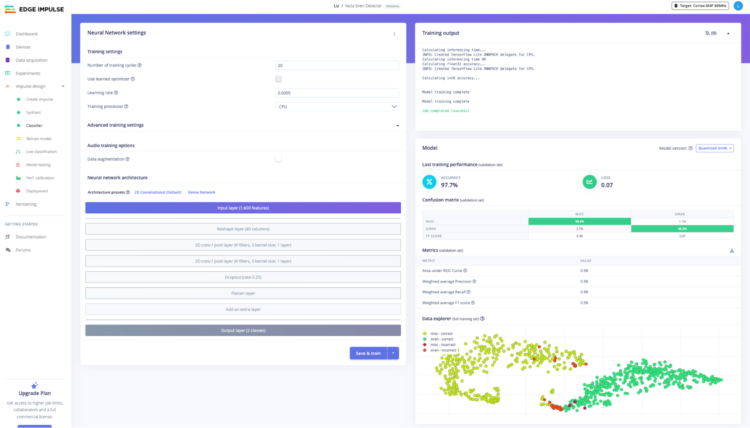
- Click Save & train. This step will take some time:
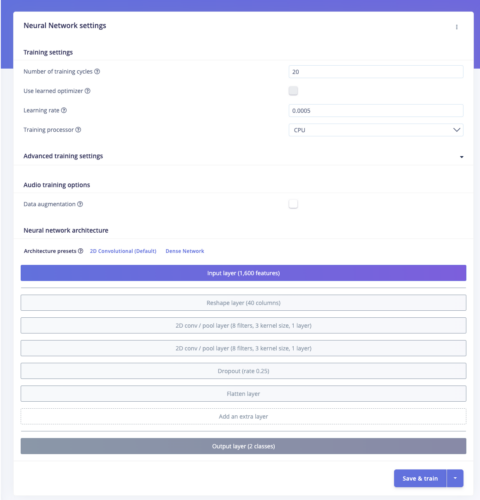
- When complete, click on Deployment:
- Select the Arduino Nicla Voice:
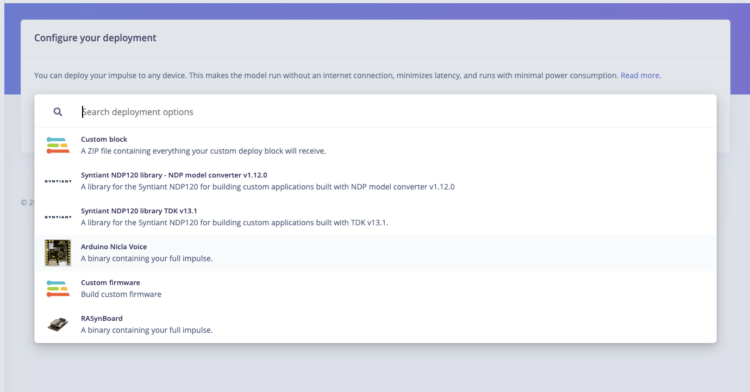
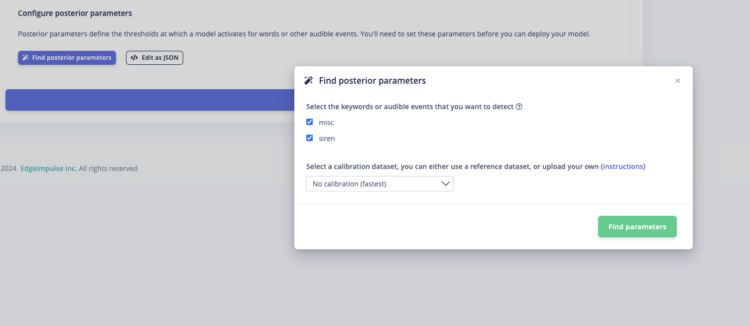
- Click on Find posterior parameters, enable your labels, then click on Find parameters:
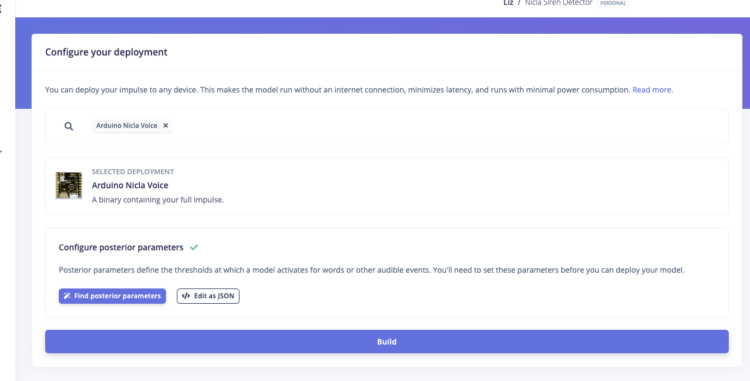
- When the process completes, select Build. This step will take some time. When it completes, a zipped file will download:
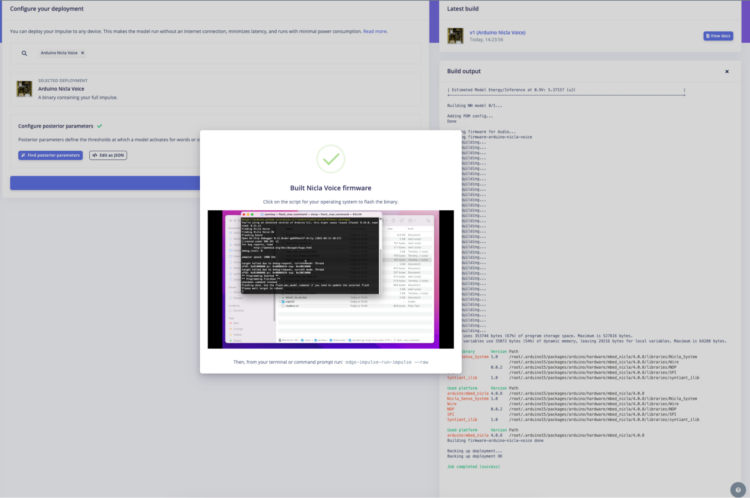
- You’ll see a screen like this when the step is complete:
- Follow the instructions here to set up the Nicla Voice.
- Unzip the Edge Impulse zipped folder.
- Double-click on flash_[your OS].command. On a Mac, you’ll have to have System Settings>Security open to open the file.
Connecting the Nicla and Portenta boards via BLE
The next step is to move the data from the Nicla to the Portenta.
- Open the Arduino IDE.
- Connect your Nicla Voice to the computer.
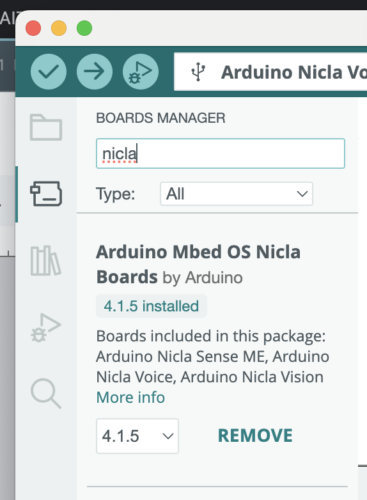
- Install the Nicla Boards:
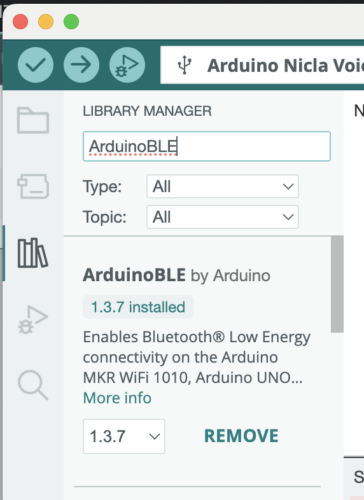
- Install the ArduinoBLE by Arduino library:
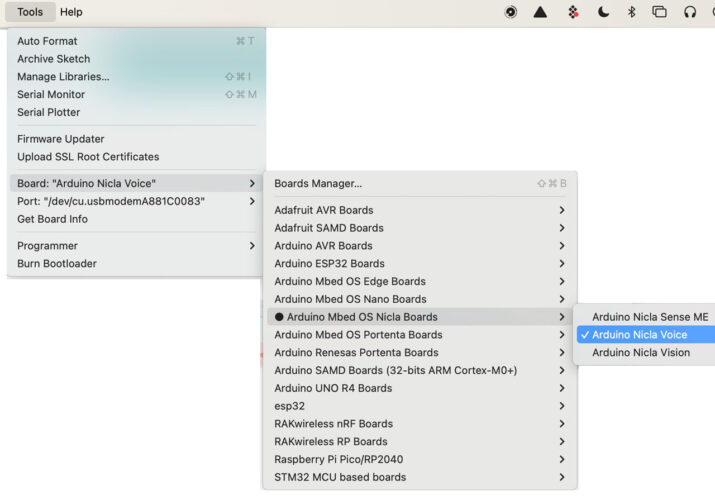
- Under Tools >Board select the Arduino Mbed OS Nicla Boards>Arduino Nicla Voice:
- Paste in this basic Nicla BLE code:
[code lang=”arduino” quickcode=”true”]
/**
Based on Door Intruder Detector @author Christopher Mendez using ML with the Nicla Voice – Application Note
Name: Nicla_Voice_Code.ino
Purpose: Nicla Voice identifying sounds with a ML model built with Edge Impulse to protect and notify through BLE to a Portenta H7 if a door is opened or an intruder has forced it.
*/#include "NDP.h"
#include <ArduinoBLE.h>// Alert Service
BLEService alertService("1802"); // Immediate alert// BLE Alert Characteristic
BLEUnsignedCharCharacteristic alertLevel("2A06", // standard 16-bit characteristic UUID
BLERead | BLENotify); // remote clients will be able to get notifications if this characteristic changes// Bluetooth® Low Energy Battery Level Characteristic
BLEUnsignedCharCharacteristic batteryLevelChar("2A19", // standard 16-bit characteristic UUID
BLERead | BLENotify); // remote clients will be able to get notifications if this characteristic changes// Variable to setup the lowest power consumption for the board if set to true.
const bool lowestPower = false;// Global Parameters
int oldBatteryLevel = 0; // last battery level reading.
int firstSent = 0; // to send just once the BLE characteristics at system boot up.// Global Parameters
int oldAlertLevel = 0;
/*************************************
* Nicla Voice ML node Routines
*************************************//**
Inference Interruption Callback to be executed with every triggered inference,
It controls the built-in LED's and sends the alerts through BLE.
Possible labels: NN0:misc, NN0:sirenAlerts: 0 = misc, 1 = siren
@param label The inferred category label
*/
void BLEsend(char* label) {if (strcmp(label, "NN0:misc") == 0) {
alertLevel.writeValue(0);
NDP.noInterrupts();
nicla::leds.begin();
nicla::leds.setColor(green);
delay(3000);
nicla::leds.end();
NDP.interrupts();
}
if (strcmp(label, "NN0:siren") == 0) {
alertLevel.writeValue(1);
NDP.noInterrupts();
nicla::leds.begin();
nicla::leds.setColor(red);
delay(3000);
nicla::leds.end();
NDP.interrupts();
}
if (!lowestPower) {
Serial.println(label);
}
}/**
Blinking green LED when called.
*/
void ledGreenOn() {
nicla::leds.begin();
nicla::leds.setColor(green);
delay(200);
nicla::leds.setColor(off);
nicla::leds.end();
}/**
Infinite blinking red LED when a system error occurred.
*/
void ledRedBlink() {
while (1) {
nicla::leds.begin();
nicla::leds.setColor(red);
delay(200);
nicla::leds.setColor(off);
delay(200);
nicla::leds.end();
}
}/**
Blinking blue LED when called (for BLE connection).
*/
void ledBlueBlink() {for (int i = 0; i <= 2; i++) {
nicla::leds.begin();
nicla::leds.setColor(blue);
delay(200);
nicla::leds.setColor(off);
delay(200);
nicla::leds.end();
}
}/**
Main section setup
*/
void setup() {Serial.begin(115200);
// Nicla System setup
nicla::begin();
nicla::disableLDO();
nicla::enableCharging(100); // enabling the battery charger
nicla::leds.begin();// Initialize BLE
if (!BLE.begin()) {
Serial.println("Starting BLE failed!");
while (1) {
}
}// BLE service and characteristics setup
BLE.setLocalName("Nicla Siren Detector"); // Device Name
BLE.setAdvertisedService(alertService); // add the service UUID
alertService.addCharacteristic(alertLevel); // add the alert level characteristic
alertService.addCharacteristic(batteryLevelChar); // add the alert level characteristic
BLE.addService(alertService); // add the alert service
alertLevel.writeValue(0); // set initial value for this characteristic
batteryLevelChar.writeValue(0); // add the alert service
// set initial value for this characteristic// Neural Desicion Processor callbacks setup
NDP.onError(ledRedBlink);
NDP.onMatch(BLEsend);
NDP.onEvent(ledGreenOn);Serial.println("Loading synpackages");
// Neural Desicion Processor firmware and ML model files loading
NDP.begin("mcu_fw_120_v91.synpkg");
NDP.load("dsp_firmware_v91.synpkg");
NDP.load("ei_model.synpkg");
Serial.println("packages loaded");
NDP.getInfo();
Serial.println("Configure mic");
NDP.turnOnMicrophone();// start advertising
BLE.advertise();nicla::leds.end();
// For maximum low power; please note that it's impossible to print after calling these functions
if (lowestPower) {
NRF_UART0->ENABLE = 0;
}
}void loop() {
BLEDevice central = BLE.central();
if (central) {
// start inferencing after BLE connected
ledBlueBlink();
NDP.interrupts();
while (central.connected()) {// Battery charger output logic to record the actual battery level
int batteryLevel = nicla::getBatteryVoltagePercentage();// send the battery status just once after connected to central
if (firstSent == 0) {
batteryLevelChar.writeValue(batteryLevel);
Serial.println("First battery status sent");
Serial.println(batteryLevel);
firstSent = 1;
}if (batteryLevel != oldBatteryLevel && firstSent) { // if the battery level has changed
batteryLevelChar.writeValue(batteryLevel); // update the battery level characteristic
oldBatteryLevel = batteryLevel; // save the level for next comparison
}/*if(firstSent){
batteryLevelChar.writeValue(batteryLevel); // update the battery level characteristic
}*/// sleep and save power
delay(1000);
}
} else {
// stop inferencing after BLE disconnected
NDP.noInterrupts();
alertLevel.writeValue(0);
firstSent = 0;
delay(1000);
}
}
[/code] - Upload the code to the Nicla.
- Connect your Portenta H7 to your computer via USB-C.
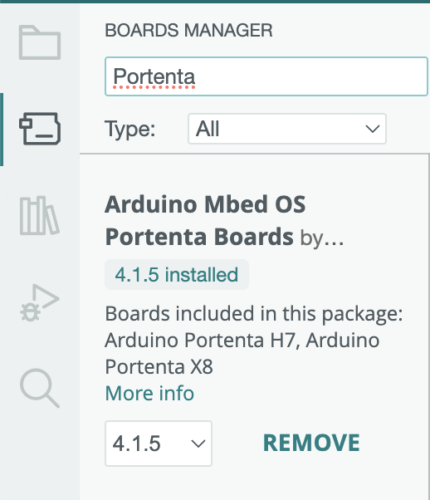
- Install the Portenta Boards:
- Under Tools >Board select the Arduino Mbed OS Portenta Boards>Portenta H7.
- Create a new sketch and replace the contents with the following code:
[code lang=”arduino” quickcode=”true”]
/**
Based on Door Intruder Detector @author Christopher Mendez using ML with the Nicla Voice – Application Note
Name: Portenta_H7_Code.ino
Purpose: Portenta H7 as host receiving BLE notifications from a Nicla Voice
*/#include <ArduinoBLE.h>
// Global Parameters
byte BatteryValue = 0; // last battery level received.
byte AlertValue = 0; // last alert value received.// last alert value received.
bool control = false; // flow control variable for repetitive events
String SirenEvent = "System initiated";bool BLEstatus;
bool alertStatus;
int sirenCounter = 0;/**
Main section setup
*/
void setup() {
delay(1000);// Initialize serial and wait for port to open:
Serial.begin(115200);
Serial.println("Starting…");
sirenCounter = 0;// Arduino Cloud connection status LED
pinMode(LEDG, OUTPUT);// Initialize BLE
if (!BLE.begin()) {
Serial.println("Starting BLE failed!");
while (1) {
}
}#ifndef TARGET_PORTENTA_H7
Serial.println("Unsupported board!");
while (1)
;
#endif// start scanning for peripheral
BLE.scan();
Serial.println("Scanning for peripherals.");
}void loop() {
// check if a peripheral has been discovered
BLEDevice peripheral = BLE.available();
if (peripheral) {
// peripheral discovered, print out address, local name, and advertised service
Serial.print("Found ");
Serial.print(peripheral.address());
Serial.print(" '");
Serial.print(peripheral.localName());
Serial.print("' ");
Serial.print(peripheral.advertisedServiceUuid());
Serial.println();// Check if the peripheral is a Nicla Lock:
if (peripheral.localName() == "Nicla Siren Detector") {
// stop scanning
BLE.stopScan();// Nicla Voice node connection handler
NiclaSirenHandler(peripheral);// peripheral disconnected, start scanning again
BLE.scan();
}
}
}/*************************************
* Portenta H7 host Routines
*************************************/
/**@param peripheral Nicla Lock peripheral and all it's characteristics.
@param alertLevel standard characteristic for inmediate alerts.
*/
void NiclaSirenHandler(BLEDevice peripheral) {
// connect to the peripheral
Serial.println("Connecting …");
if (peripheral.connect()) {
Serial.println("Connected");
} else {
Serial.println("Failed to connect!");
return;
}// discover peripheral attributes
Serial.println("Searching for service 1802 …");if (peripheral.discoverService("1802")) {
Serial.println("Service discovered");
} else {
Serial.println("Attribute discovery failed.");
peripheral.disconnect();while (1)
;
return;
}// retrieve the simple key characteristics
BLECharacteristic alertLevel = peripheral.characteristic("2A06");
BLECharacteristic batteryLevelChar = peripheral.characteristic("2A19");// subscribe to the simple key characteristics process
Serial.println("Subscribing to simple key characteristic …");
if (!alertLevel || !batteryLevelChar) {
Serial.println("no simple key characteristic found!");
peripheral.disconnect();
return;
} else if (!alertLevel.canSubscribe() || !batteryLevelChar.canSubscribe()) {
Serial.println("simple key characteristic is not subscribable!");
peripheral.disconnect();
return;
} else if (!alertLevel.subscribe() || !batteryLevelChar.subscribe()) {
Serial.println("subscription failed!");peripheral.disconnect();
return;
} else {
Serial.println("Subscribed to Alert Characteristic");
}// Gathering Characteristics initial values and printing them
batteryLevelChar.readValue(BatteryValue);
alertLevel.readValue(AlertValue);Serial.print("Alert: ");
Serial.println(AlertValue);
alertStatus = AlertValue;Serial.print("Battery Level: ");
Serial.print(BatteryValue);
Serial.println(" %");// while the peripheral is connected
while (peripheral.connected()) {
BLEstatus = true;
// check if the value of the characteristic has been updated
if (batteryLevelChar.valueUpdated()) {batteryLevelChar.readValue(BatteryValue);
Serial.print("Battery Level: ");
Serial.print(BatteryValue);
Serial.println(" %");
}// check if the value of the characteristic has been updated
if (alertLevel.valueUpdated()) {alertLevel.readValue(AlertValue);
Serial.print("Alert: ");
Serial.println(AlertValue);Serial.print("SirenCounter: ");
Serial.println(sirenCounter);if (AlertValue == 0) { // if the Alert = 0 means misc
control = !control; // as variables are updated if they change, add a simple dot "." to be able to update it if happens twice consecutive.
if (control) {
SirenEvent = "misc";
} else {
SirenEvent = "misc.";
}alertStatus = false;
} else if (AlertValue == 1) { // if the Alert = 1 means siren
control = !control; // as variables are updated if they change, add a simple dot "." to be able to update it if happens twice consecutive.
if (control) {
sirenCounter++;
SirenEvent = "Siren detected!";
} else {
sirenCounter++;
SirenEvent = "Siren detected!.";
}alertStatus = true;
}
}
}
Serial.println("Nicla Siren Detector disconnected!");
BLEstatus = false;
}
[/code] - Upload the program to the board.
Connecting to TTN
If all works, you’ll want to modify the Portenta script to send data to The Things Network.
- Save your Arduino Portenta Sketch. Then select Save as and give the Sketch a different name.
- Connect the Portenta Vision Shield – LoRa to the Portenta H7:
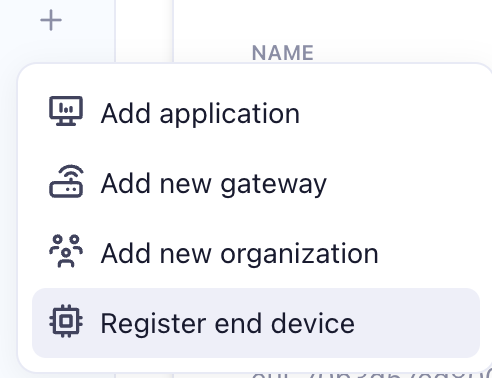
- Register your Portenta Vision Shield -LoRa with TTN:
- Back in Arduino, add a tab called arduino_secrets.h . Paste in the following code and complete with your APP EUI and KEY:
[code lang=”arduino”]#define SECRET_APP_EUI "[XXX]"
#define SECRET_APP_KEY "[XXX]"[/code] - Install the MKRWAN library.
- Replace the current program with this code:
[code lang=”arduino” quickcode=”true”]
/**
Based on Door Intruder Detector @author Christopher Mendez using ML with the Nicla Voice – Application Note
Name: Portenta_H7_Code.ino
Purpose: Portenta H7 as host receiving BLE notifications from a Nicla Voice and sending them to the Arduino IoT Cloud for visualization.*/
#include <ArduinoBLE.h>
#include <MKRWAN.h>
#include "arduino_secrets.h"// Global Parameters
byte BatteryValue = 0; // last battery level received.
byte AlertValue = 0; // last alert value received.
bool control = false; // flow control variable for repetitive eventsbool ready = false;
String SirenEvent = "System initiated";bool BLEstatus;
bool alertStatus;
int sirenCounter = 0;LoRaModem modem;
// Sensitive data in arduino_secrets.h
String appEui = SECRET_APP_EUI;
String appKey = SECRET_APP_KEY;uint16_t s;
unsigned long lastTimeSent = 0;
unsigned long currentMillis = 0;
const unsigned long interval = 60000;/**
Main section setup
*/
void setup() {
delay(1000);
// Initialize serial and wait for port to open:
Serial.begin(115200);
Serial.println("Starting…");
analogReadResolution(16);
pinMode(LEDG, OUTPUT);sirenCounter = 0;
// Arduino Cloud connection status LED
pinMode(LEDG, OUTPUT);
pinMode(LEDR, OUTPUT);
if (!ready) {
if (!modem.begin(US915)) {
Serial.println("Failed to start module");
while (1) {}
}
Serial.print("Your module version is: ");
Serial.println(modem.version());
Serial.print("Your device EUI is: ");
Serial.println(modem.deviceEUI());
Serial.println("trying to join");
int connected = modem.joinOTAA(appEui, appKey);
if (!connected) {
Serial.println("Something went wrong; Will retry");
ready = false;
digitalWrite(LEDG, LOW);
setup();
}
Serial.println("Successfully joined network!");
digitalWrite(LEDG, HIGH);// Set poll interval to 60 secs.
modem.minPollInterval(60);
// NOTE: independent of this setting, the modem will
// not allow sending more than one message every 2 minutes,
// this is enforced by firmware and can not be changed.
modem.setADR(true);
modem.dataRate(3);ready = true;
}
if (ready) {// Initialize BLE
if (!BLE.begin()) {
Serial.println("Starting BLE failed!");
while (1) {
}
}#ifndef TARGET_PORTENTA_H7
Serial.println("Unsupported board!");
while (1)
;
#endif// start scanning for peripheral
BLE.scan();
Serial.println("Scanning for peripherals.");
}
}void loop() {
// check if a peripheral has been discovered
BLEDevice peripheral = BLE.available();if (peripheral) {
// peripheral discovered, print out address, local name, and advertised service
Serial.print("Found ");
Serial.print(peripheral.address());
Serial.print(" '");
Serial.print(peripheral.localName());
Serial.print("' ");
Serial.print(peripheral.advertisedServiceUuid());
Serial.println();// Check if the peripheral is a Nicla Siren:
if (peripheral.localName() == "Nicla Siren Detector") {
// stop scanning
BLE.stopScan();// Nicla Voice node connection handler
NiclaSirenHandler(peripheral);// peripheral disconnected, start scanning again
BLE.scan();
}
}
}/*************************************
* Portenta H7 host Routines
*************************************/
/**
@param peripheral Nicla Siren peripheral and all it's characteristics.
@param alertLevel standard characteristic for inmediate alerts.
*/
void NiclaSirenHandler(BLEDevice peripheral) {
// connect to the peripheral
Serial.println("Connecting …");
if (peripheral.connect()) {
Serial.println("Connected");
} else {
Serial.println("Failed to connect!");
return;
}// discover peripheral attributes
Serial.println("Searching for service 1802 …");if (peripheral.discoverService("1802")) {
Serial.println("Service discovered");
} else {
Serial.println("Attribute discovery failed.");
peripheral.disconnect();while (1)
;
return;
}
// retrieve the simple key characteristics
BLECharacteristic alertLevel = peripheral.characteristic("2A06");
BLECharacteristic batteryLevelChar = peripheral.characteristic("2A19");// subscribe to the simple key characteristics process
Serial.println("Subscribing to simple key characteristic …");
if (!alertLevel || !batteryLevelChar) {
Serial.println("no simple key characteristic found!");
peripheral.disconnect();
return;
} else if (!alertLevel.canSubscribe() || !batteryLevelChar.canSubscribe()) {
Serial.println("simple key characteristic is not subscribable!");
peripheral.disconnect();
return;
} else if (!alertLevel.subscribe() || !batteryLevelChar.subscribe()) {
Serial.println("subscription failed!");peripheral.disconnect();
return;
} else {
Serial.println("Subscribed to Alert Characteristic");
}// Gathering Characteristics initial values and printing them
batteryLevelChar.readValue(BatteryValue);
alertLevel.readValue(AlertValue);Serial.print("Alert: ");
Serial.println(AlertValue);
alertStatus = AlertValue;Serial.print("Battery Level: ");
Serial.print(BatteryValue);
Serial.println(" %");// while the peripheral is connected
while (peripheral.connected()) {
BLEstatus = true;
// check if the value of the characteristic has been updated
if (batteryLevelChar.valueUpdated()) {batteryLevelChar.readValue(BatteryValue);
Serial.print("Battery Level: ");
Serial.print(BatteryValue);
Serial.println(" %");
}
// check if the value of the characteristic has been updated
if (alertLevel.valueUpdated()) {alertLevel.readValue(AlertValue);
Serial.print("Alert: ");
Serial.println(AlertValue);Serial.print("SirenCounter: ");
Serial.println(sirenCounter);if (sirenCounter >= 1) {
Serial.println("sendData()");
sendData();
}
}if (AlertValue == 0) { // if the Alert = 0 means misc
control = !control; // as variables are updated if they change, add a simple dot "." to be able to update it if happens twice consecutive.
if (control) {
SirenEvent = "misc";
} else {
SirenEvent = "misc.";
}alertStatus = false;
} else if (AlertValue == 1) { // if the Alert = 1 means siren
control = !control; // as variables are updated if they change, add a simple dot "." to be able to update it if happens twice consecutive.
if (control) {
if (sirenCounter < 1) {
sirenCounter = 1;
}
SirenEvent = "Siren detected!";
} else {if (sirenCounter < 1) {
sirenCounter = 1;
}
SirenEvent = "Siren detected!.";
}alertStatus = true;
}
}Serial.println("Nicla Siren Detector disconnected!");
BLEstatus = false;
}
void sendData() {currentMillis = millis();
if (sirenCounter == 1 && currentMillis – lastTimeSent > interval) {Serial.println("sending ");
Serial.print("sirenCounter=");
Serial.println(sirenCounter);
s = sirenCounter;
uint16_t v = BatteryValue;byte buffer[4];
buffer[0] = s >> 8;
buffer[1] = s;
buffer[2] = v >> 8;
buffer[3] = v;modem.setPort(3);
modem.beginPacket();
modem.write(buffer, 4);int err = modem.endPacket(true);
if (err > 0) {
Serial.println("Message sent correctly!");
sirenCounter = 0;
AlertValue = 0;
} else {
Serial.println("Error sending message :(");sendData();
}
lastTimeSent = currentMillis;
} else {
Serial.println("too soon to send");
}
}
[/code] - In TTN we need to parse the siren and voltage, but we also want to add a timestamp. Set your payload formatter to Custom Javascript formatter and set the code to this:
[code lang=”js” quickcode=”true”]
function decodeUplink(input) {
data= {},
data.sirens=((input.bytes[0]>>8)+input.bytes[1]);
data.battery_v = ((input.bytes[2] << 8) + input.bytes[3]);
// Get current time
var now = new Date();// Calculate EST offset (EST is UTC-5)
var estOffset = -5 * 60 * 60 * 1000; // 5 hours in milliseconds// Apply EST offset
var estTime = new Date(now.getTime() + estOffset);// Format the time
var year = estTime.getUTCFullYear();
var month = (estTime.getUTCMonth() + 1).toString().padStart(2, '0');
var day = estTime.getUTCDate().toString().padStart(2, '0');
var hours = estTime.getUTCHours().toString().padStart(2, '0');
var minutes = estTime.getUTCMinutes().toString().padStart(2, '0');
var seconds = estTime.getUTCSeconds().toString().padStart(2, '0');data.time = `${year}-${month}-${day} ${hours}:${minutes}:${seconds} EST`;
var warnings=[];
return{
data:data,
warnings:warnings
};
}[/code]
Adding a Battery (Optional)
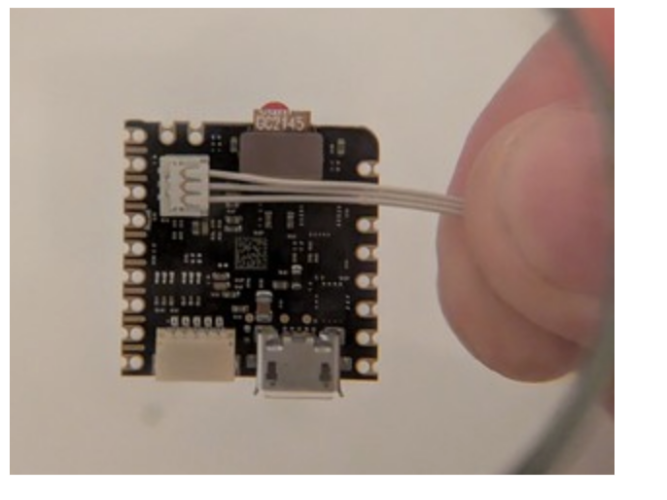
To power the Nicla or Portenta by battery, you need to use a single cell 3.7 V Li-Po or Li-Ion battery (700 mAh minimum) connecting to a 3-pin BM03B-ACHSS-GAN-TF connector.
If you wanted to use a battery instead of a solar power system, see how Tamberg (an Arduino forum user) connected a Lipo battery to the Nicla with parts from Digikey (455-2198-ND, 455-3345-ND):
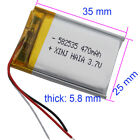
Or, you can try to find the battery (3.7V 470 mAh 582535 Thermistor Li LiPo Battery JST-XH 3pin 1.0/1.25/1.5/2.0/2.54 and ACHR-03V-S JST Sales America Inc.)
However you end up powering the Nicla, you’ll need to characterize the power consumption so that you can ensure you can provide enough power.
Characterizing the Power Consumption
To characterize the power consumption, the Qoitech Otii Ace is a handy tool.
Here are the results from the Qoitech Otii Ace:
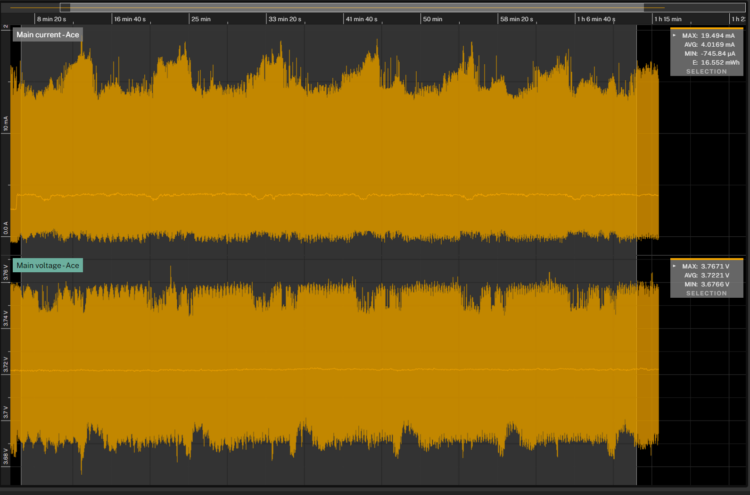
These results show that the Nicla is consuming:
16.5 mWh or 0.016 * 24=~0.38Wh per dayIn general, we like to power IoT devices with solar panels that produce at least 1.5x the average power consumption per day and provide storage for about 5 days with no sun. In this case, the solar power from our 0.3 Watt, 3.3 Volt Solar Power System is sufficient but the storage capacity will be low. The system includes a 0.3 Watt, 3.3 Volt Solar Panel, a 250F Lithium Ion Capacitor solar charger with 2.5 – 3.8V unregulated output, and a IP67 ASA waterproof enclosure with pole mount attachments.
Because we are working with an unregulated voltage between 2.5-3.8V, we’ll need to add a MT3608 (DC to DC Step Up Boost Converter Module) to set the voltage to 3.5V, the minimum voltage that the Nicla needs to run.
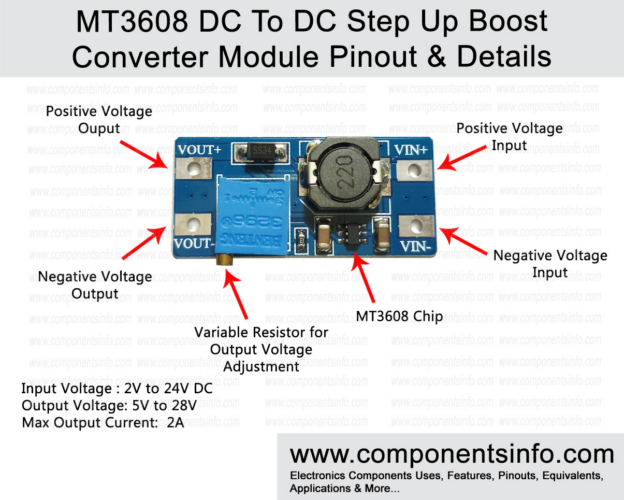
https://www.componentsinfo.com/mt3608-module-pinout-datasheet/
The Portenta H7 is not as low powered as the Nicla. Below you’ll find the Qoitech Otii Ace results for the Portenta H7 running with the Nicla Voice.
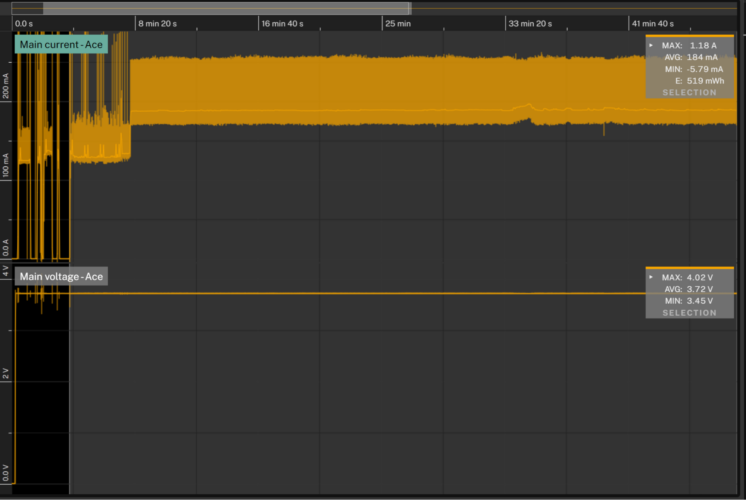
We could choose a larger panel and a battery with more capacity or we can keep the Portenta indoors and run it off of a USB-C to a wall power supply . In addition to sending data to the Things Network, the Portenta could potentially tell us if a siren was detected outdoors by flashing a light, generating a sound, controlling a motor, or some other indicator. A setup where one device outdoors sends environmental data indoors has the potential to create immersive interactions that bring the outdoors in.Conclusion
This simple project shows how to build a relatively low power machine learning application with off-the-shelf components and little in the way of optimization, but hopefully this example can be a source of inspiration for some other, more advanced use cases:
- Anomaly detection for defect detection
- Keywords recognition or voice commands to control devices
- Specific sounds detection for security applications
- Noise and vibration detection for predictive maintenance applications
- Gesture recognition
- Touchless interfaces
-
-
Leave a Reply